From an email
Connect your support address. Create tickets automatically from new emails, or review incoming messages before turning them into work.
 Mill™
Mill Tickets
A complete place for email support. Turn requests into organised work, answer with AI assistance and give every customer a clear next step.
Included in every plan · 14-day trial · No credit card
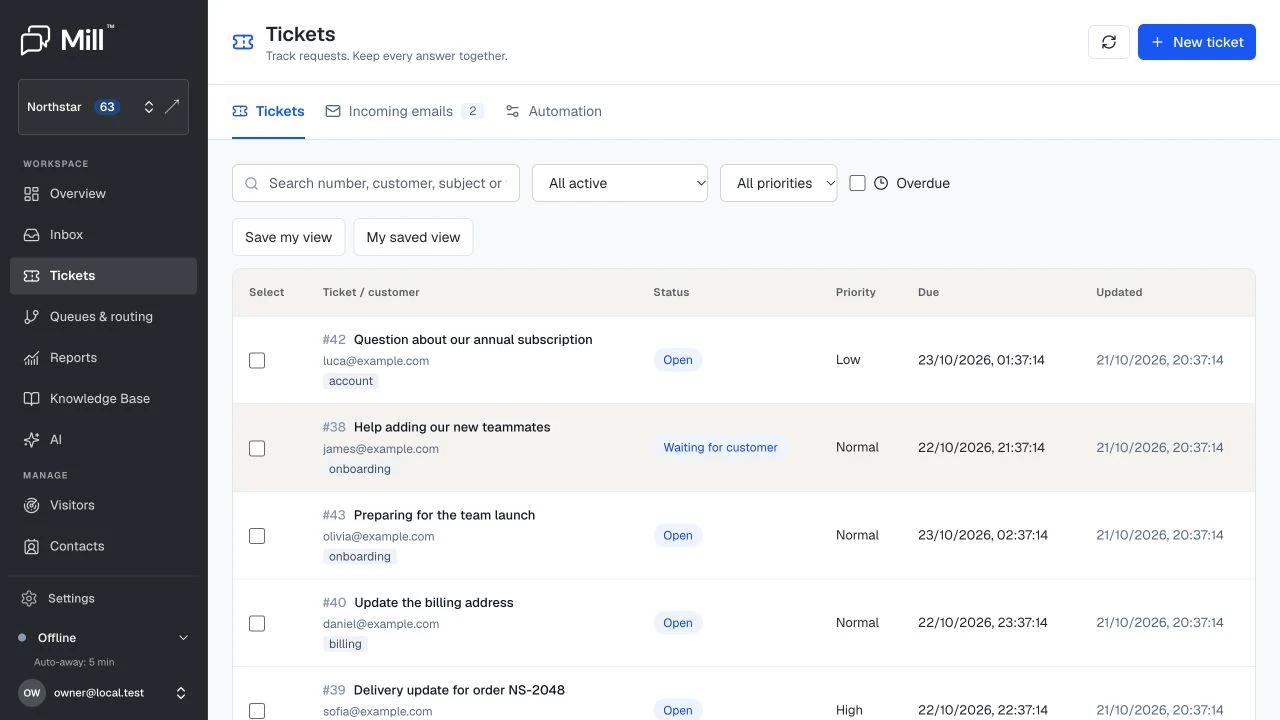
Three ways in. One place to work.
A billing question, an account change, a request that needs another team. Bring the next step into a dedicated ticket workspace.
Connect your support address. Create tickets automatically from new emails, or review incoming messages before turning them into work.
Turn a conversation into a follow-up ticket. Keep the original chat linked, with a clear reference for the work still to do.
Create a ticket for a customer yourself. Add the subject and a private description, then choose whether to send a confirmation.
From request to resolution
A new request becomes a numbered ticket.
Choose an owner, priority, tags and a due date.
Reply to the customer and leave private notes for your team.
Mark the work resolved and keep its conversation together.
The conversation stays connected
Read the customer’s request, see who owns it and work through the answer in the same place. Public replies and private notes keep customers informed and colleagues aligned.
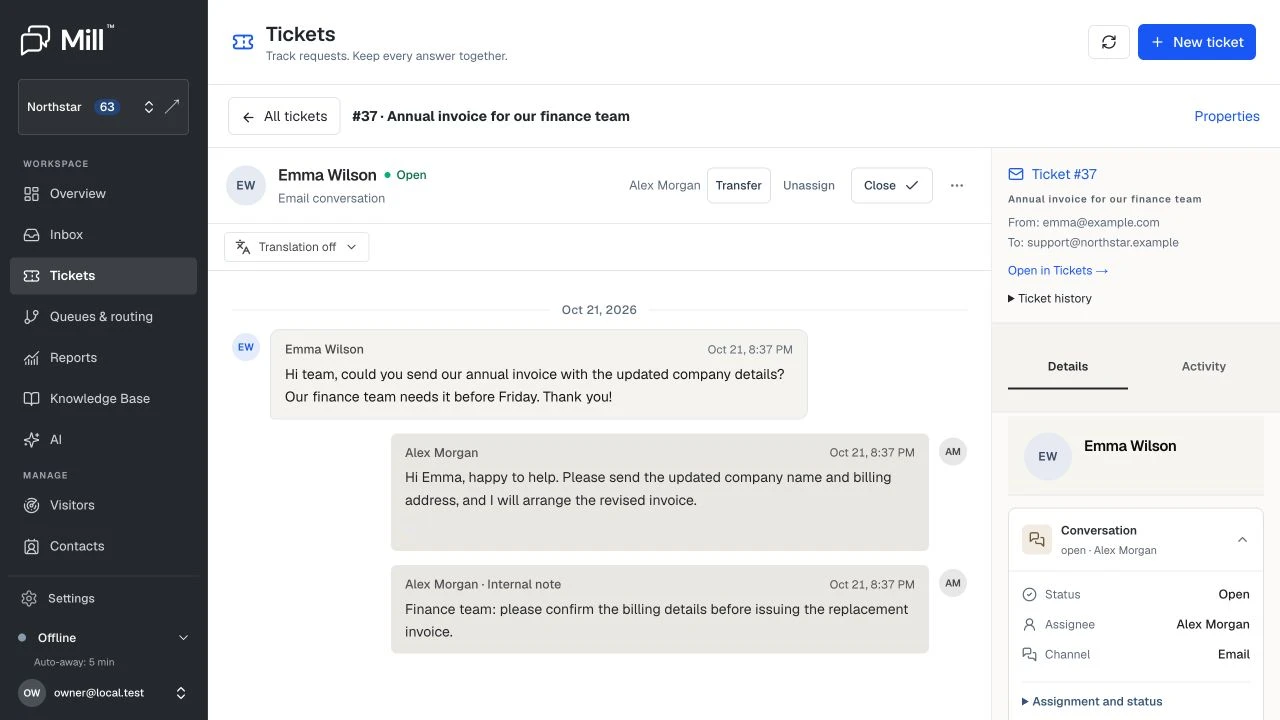
The customer’s request. Your team’s context.Enlarge
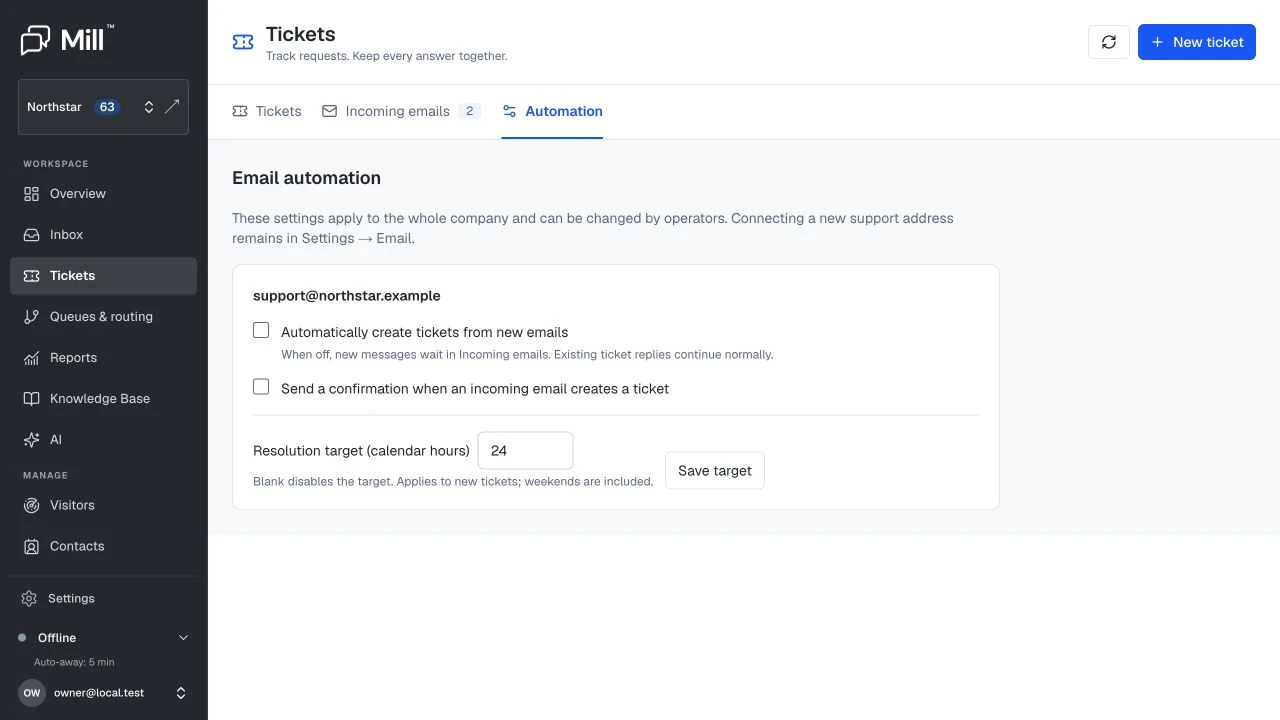
Automation, on your terms
Choose how each support address handles new mail. Existing ticket replies stay connected whichever mode you use.
Keep automatic creation off and review new messages in Incoming emails. An operator can create a ticket or dismiss a message that doesn’t need follow-up.
Operators stay in control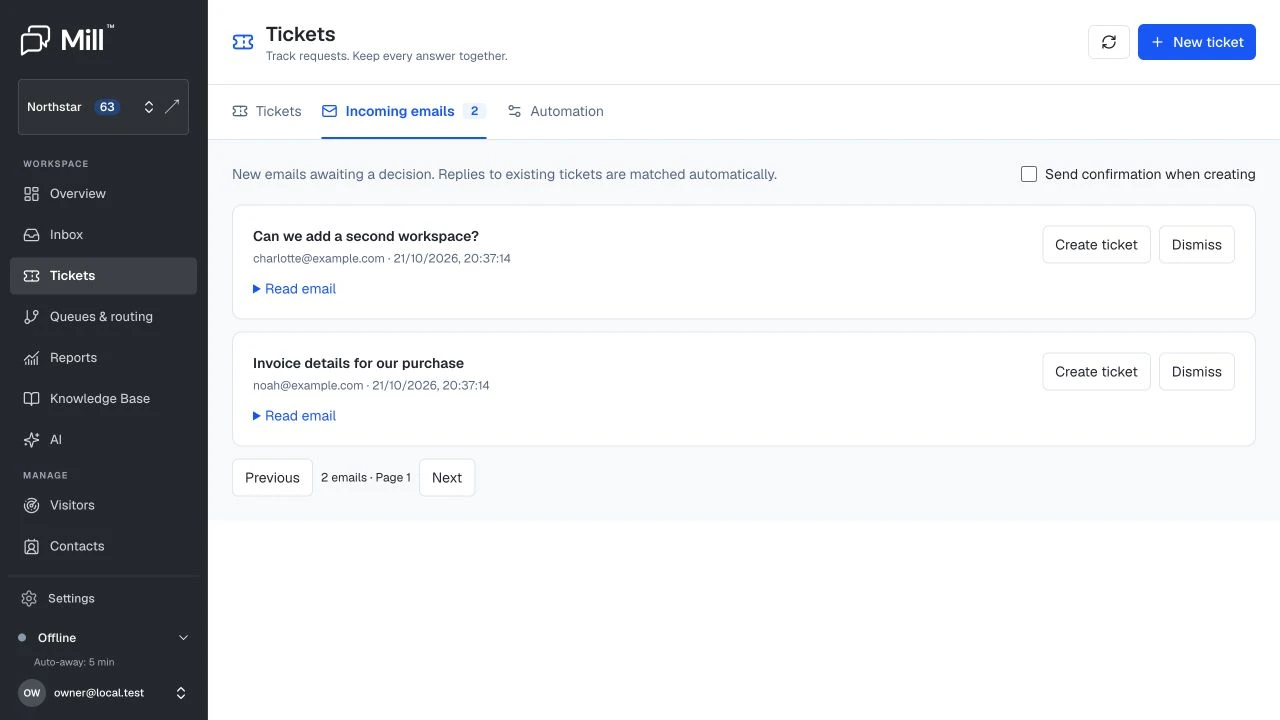
Enable ticket creation for new emails, choose whether customers receive a confirmation and set a resolution target for new requests.
Targets use calendar hours, including weekends.
The details that keep work moving
Practical controls for a busy support team, without turning every request into a complicated process.
Assign requests to an operator and transfer them when another teammate is better placed to help.
Use low, normal, high or urgent priority alongside open, waiting, resolved and closed statuses.
Set due dates and filter overdue active tickets to find the requests that need attention.
Add tags and search by ticket number, customer, subject or tag. Save a personal view on your current device.
Keep internal notes separate from customer replies. Use saved replies and attachments when answering.
Let customers know a ticket was created, with a reference number they can use in their reply.
Connect your support address
Keep your existing mailbox. A guided setup takes you through address verification, sending DNS records and forwarding checks.
Set up your workspace →Confirm that you have access to the support email you want to connect.
Copy the sending records to your domain provider. Mill checks them before you continue.
Set up forwarding from your current mailbox and test that messages arrive in Mill.
Activate the connection, then choose automatic tickets or an incoming queue for review.
Recognisably yours
Customers should recognise the team helping them. Set your logo, accent colour, background and footer. Choose a ticket prefix and starting number that suit your business.
Try a colour in the email preview. Set your own in Mill.
A discreet “Delivered by Mill” credit is included by default. Remove it on Business and Scale, with the same branding control as your chat widget.
Compare plansHi Alex,
Your oak dining table is booked for delivery on Friday. The delivery team will call you 30 minutes before they arrive.
Just reply here if you need anything else.
Best,
Sam · Willow Support
Use a soft, slightly damp cloth for everyday cleaning. Avoid harsh cleaners and wipe up spills promptly.
For the full care routine, see our furniture care guide.
Your knowledge, put to work
Bring Reply Assist into your ticket workflow. Use the customer’s conversation and your company’s knowledge base to prepare a useful answer, then review it before sending.
Support travels with you
Browse requests across your companies on iPhone and Android. See unread counts, open the right ticket from a notification and keep the next step moving.
Get the Mill appsAll companies
Could we make that Friday morning?
Thank you — 10am works for me.
An email ticketing system turns customer requests into trackable work. Mill gives each ticket a number, an owner, a status and a conversation history, so your team can follow a request through to resolution.
Yes. Create a ticket from a chat when a question needs follow-up. The original chat is retained and linked to the ticket, so your team can return to the source conversation.
Yes. Choose a connected support address, enter the customer’s email and subject, and add a private description. You can optionally send the customer a confirmation that includes the ticket number.
You choose for each connected support address. Turn automatic creation on, or leave new messages in Incoming emails for an operator to review and convert. Replies to existing tickets continue to join their threads.
Mill uses email threading and a ticket-specific reply address to match replies to the existing conversation. A ticket number in the subject gives your team and customer a clear reference.
Yes. Verify your support address, add the sending DNS records and forward incoming support mail to Mill. The guided setup checks the address, DNS and forwarding before activation. You can keep copies in your existing mailbox.
Yes. Tickets are included in Starter, Professional, Business and Scale. Choose your plan based on operators, brands and AI allowances. There is no separate ticketing add-on.
Set a target for new tickets in calendar hours, including weekends, or set an individual due date. Use the overdue filter to find active requests that need attention.
Included in every Mill plan
Give your team live chat and email tickets in one workspace.
14 days to explore Mill. No credit card required.