01
Turn a request into a ticket
Create an email ticket from your app. Add a private description and choose whether to send a customer confirmation.
POST /tickets Mill™
Mill API & webhooks
Bring customer support into the systems you already use. Create tickets, send replies and keep your team in sync with one REST API.
Every plan. The same API. Room to grow.
 MillAPI & webhooksConnected
ticket.createdYour workflowmessage.createdYour systemFrom a request to a result
Build your own connection between Mill and your CRM, internal tools or reporting pipeline. Your developer controls the workflow; your team keeps working in Mill.
Create an email ticket from your app. Add a private description and choose whether to send a customer confirmation.
POST /ticketsSend public replies to an existing chat or email ticket. Email responses use Mill’s delivery queue.
POST /messagesReceive ticket, message and contact events. Fetch current data through the API for your downstream workflow.
Signed webhooksBehind every API request, a real workspace
Tickets created through the API join the same ticket workspace your operators use. Keep the customer conversation, owner and status in one place.
→YOUR TEAM Assign · Reply · Resolve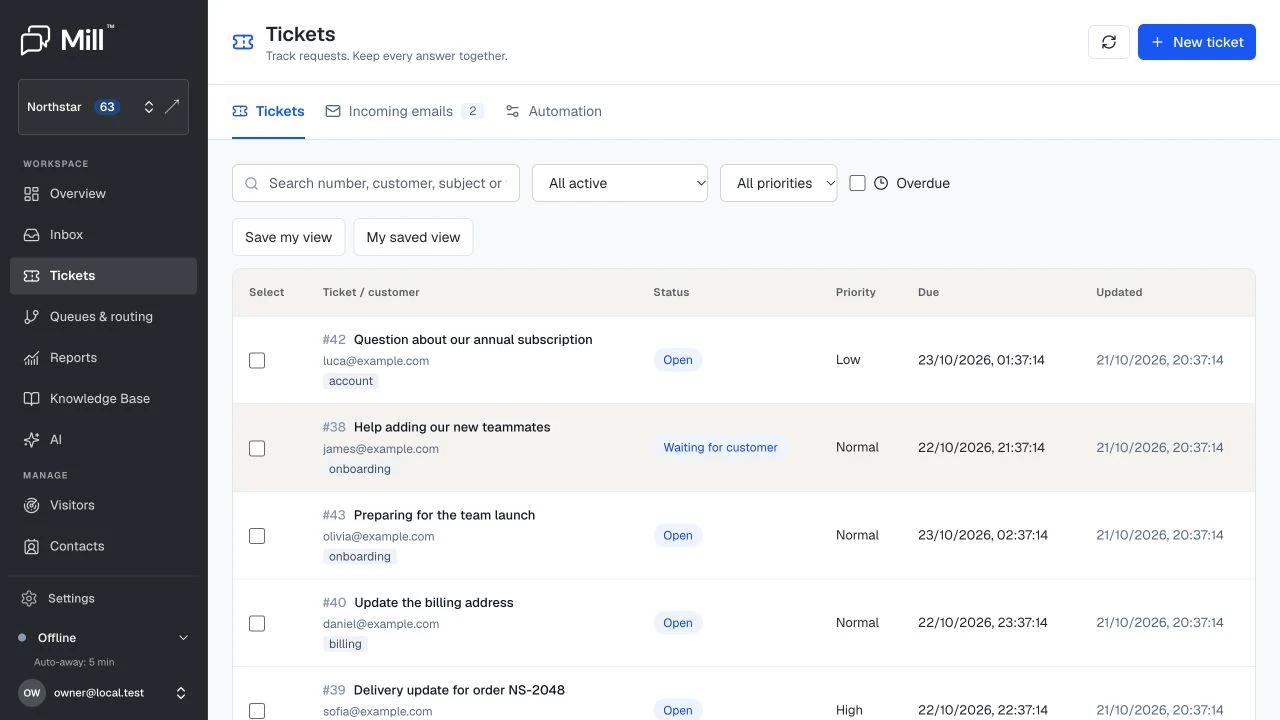 View the ticket workspace
Your integration control centre
Create a separate key for each connection. Choose what it can read or change, track the company’s monthly usage and revoke access when it is no longer needed.
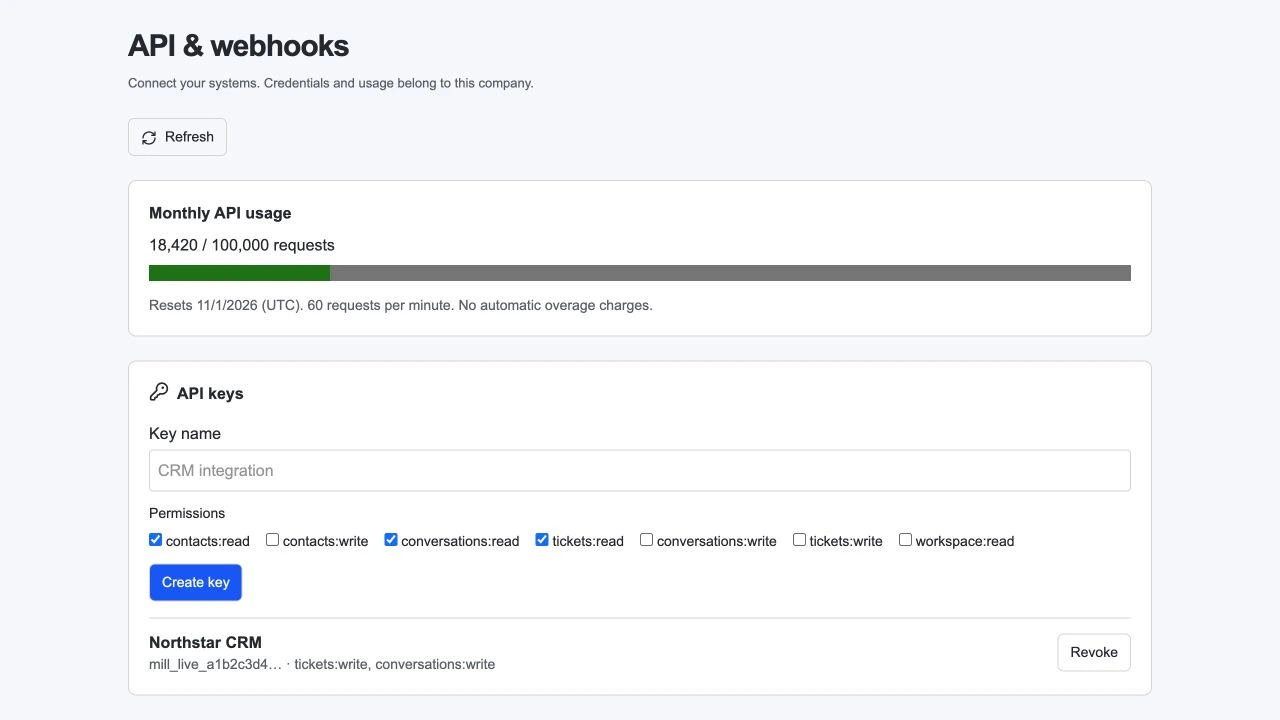 View full screen
Built for developers
Standard HTTP methods. JSON payloads. Explicit scopes. A predictable starting point for your next integration.
curl https://app.mill.chat/api/v1/tickets \
  -H "Authorization: Bearer $MILL_API_KEY" \
  -H "Content-Type: application/json" \
  -H "Idempotency-Key: $REQUEST_UUID" \
  -d '{
    "mailbox_id": "YOUR_MAILBOX_UUID",
    "email": "maya@example.com",
    "subject": "Help with order #1042",
    "body": "Customer needs a delivery update.",
    "send_confirmation": true
}'curl https://app.mill.chat/api/v1/messages \
-H "Authorization: Bearer $MILL_API_KEY" \
-H "Content-Type: application/json" \
-H "Idempotency-Key: $REQUEST_UUID" \
-d '{
"conversation_id": "YOUR_CONVERSATION_UUID",
"body": "Thanks, Maya. We are checking your order."
}'curl -X PATCH https://app.mill.chat/api/v1/tickets \
-H "Authorization: Bearer $MILL_API_KEY" \
-H "Content-Type: application/json" \
-H "Idempotency-Key: $REQUEST_UUID" \
-d '{
"id": "YOUR_CONVERSATION_UUID",
"status": "resolved",
"assigned_to": "YOUR_AGENT_UUID"
}'Use a new UUID for each operation. Reuse it for identical retries.
Keep the next step moving
Subscribe your HTTPS endpoint to customer support events. Verify each signature, then let your integration decide what happens next.
ticket.createdmessage.createdcontact.updatedconversation.updated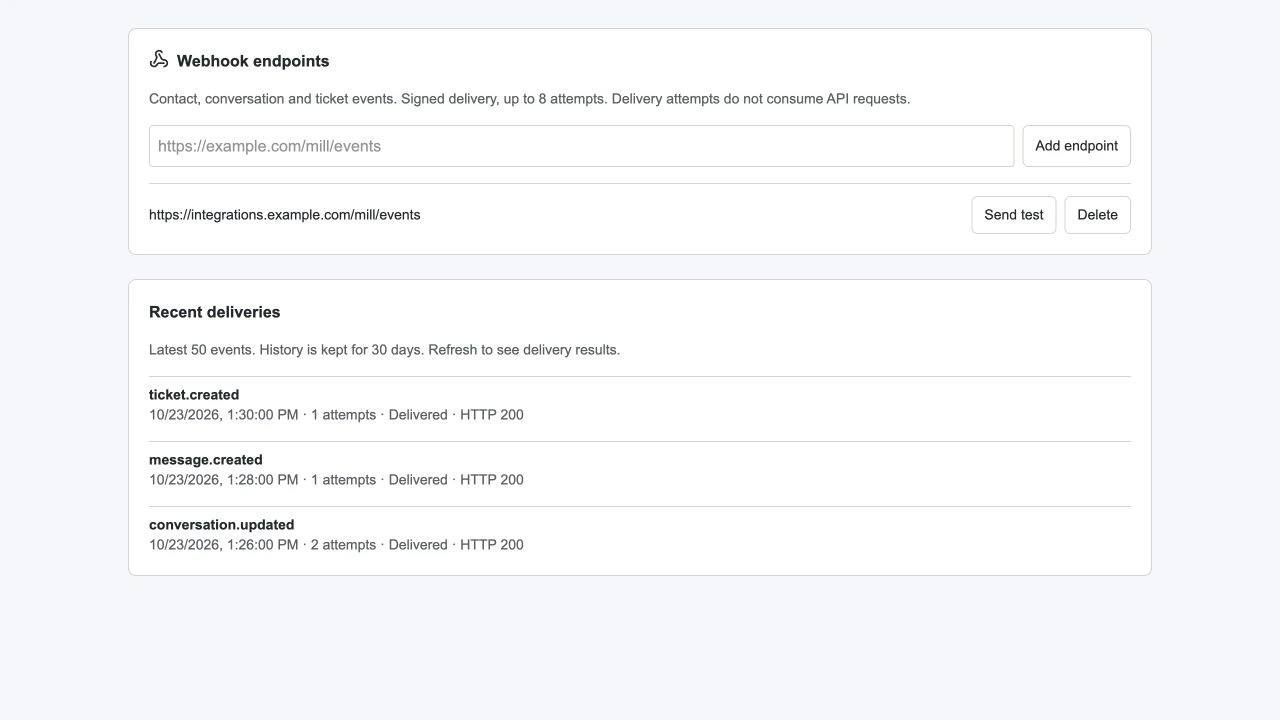 View full screen
HMAC-SHA256 signatures and timestamps help your receiver verify where each event came from.
Up to eight delivery attempts. Inspect recent results, HTTP statuses and attempts in Mill. History is kept for 30 days.
Idempotency keys protect new ticket, reply and update operations from accidental duplication. Results are retained for 30 days.
Included from day one
Choose the monthly capacity that fits your integration. The operations and webhooks stay the same.
60 requests per minute per company. Monthly usage resets on the first day of the month (UTC). Requests with a valid key and permissions count, including invalid parameters. HTTP 429 pauses API requests at the limit; your portal, chat and apps continue working. No automatic overage charges. Webhook deliveries do not use API requests.
Start with one useful connection
Open Settings → API & webhooks in your company. Select only the permissions your integration needs.
Keep your key on your server. Start with a read request, then add actions using the guide in Mill.
Add an HTTPS webhook endpoint, verify signatures and test delivery. Deduplicate events and fetch the latest state.
Yes. Starter includes 10,000 requests per month, Professional 50,000, Business 100,000 and Scale 200,000. All plans include the same API operations and signed webhooks.
Read contacts, conversations, public messages and tickets; create contacts and tickets; send replies; change status and assignment. You can also list active agents and verified mailboxes.
Usage belongs to each company and is shared by its API keys. Requests with a valid key, permission and active company count, including invalid parameters. Monthly limits reset on the first day of the month in UTC. Each company also has a 60-request-per-minute limit.
The API returns HTTP 429 and a Retry-After header. There are no automatic overage charges. Your portal, chat and apps continue working. Webhook delivery attempts do not consume API requests.
New ticket, reply and status or assignment operations require an Idempotency-Key UUID. Retry an identical request with the same key to reuse its result. A different payload returns HTTP 409. Results are retained for 30 days.
Verify the HMAC-SHA256 signature against the raw request body and timestamp using your endpoint secret. Reject old timestamps and deduplicate event IDs. Mill retries delivery up to eight attempts; events may arrive more than once or out of order.
For a custom API connection, yes. Your developer creates a server-side integration using the guide in Settings → API & webhooks. This page describes the API; it does not imply a prebuilt connector for every CRM or workflow tool.
Connect the tools behind your customer experience.
14 days. No credit card required.